 Siftwren Product Filter
Counts that match what you get
The number beside a value is what choosing it gives, with everything else you have chosen already applied.
Free WooCommerce plugin · Pro adds swatches & SEO pages
The number next to each value is exactly how many products you get by clicking it, also when one variation is sold out. No page reload; block, shortcode or Elementor widget.
Not in the WordPress.org directory yet: a person reviews every plugin before it is listed, and a name cannot be reserved in advance, so searching your admin will not find it today. What happens next →
The number and the list disagree
Illustration · sample shop
How it works
Choose what to filter on and how to show it.
A block, the shortcode [siftwren_filter id="…"] or an Elementor widget.
Each number is the products you get by choosing it.
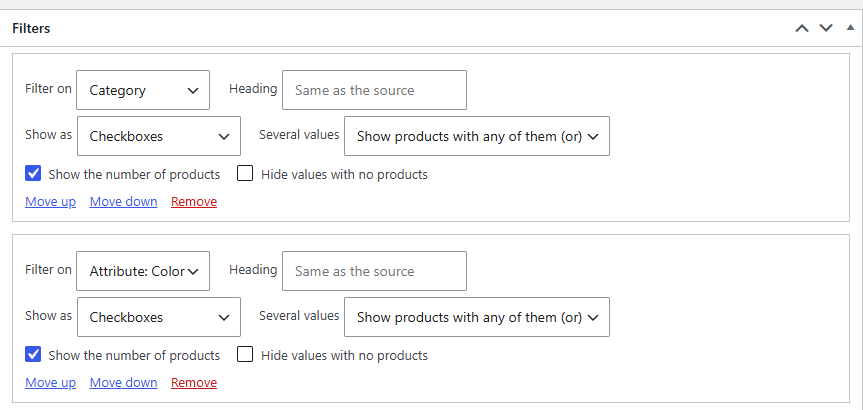
Free, and complete
Counts that disagree with the list are the complaint every filter plugin hears. Here the count is worked out the way the list is. All of this is in the free plugin.
The number beside a value is what choosing it gives, with everything else you have chosen already applied.
A hoodie whose red sizes are all sold out is not a red, in-stock product. Red plus In stock shows what is on the shelf.
Choose a value and the product list is swapped in place. If a theme does not fit, the page simply loads as usual.
One set, placed three ways and drawn the same, on the shop and on category, tag and brand pages.
Filtered pages get noindex, follow, and robots.txt gets Disallow lines. Both are on from the start.
A set that cannot be drawn is left out, and WooCommerce shows its own product list.
The real thing
A real shop page with Red and In stock chosen. Each value carries its number, and the shop agrees: three results.
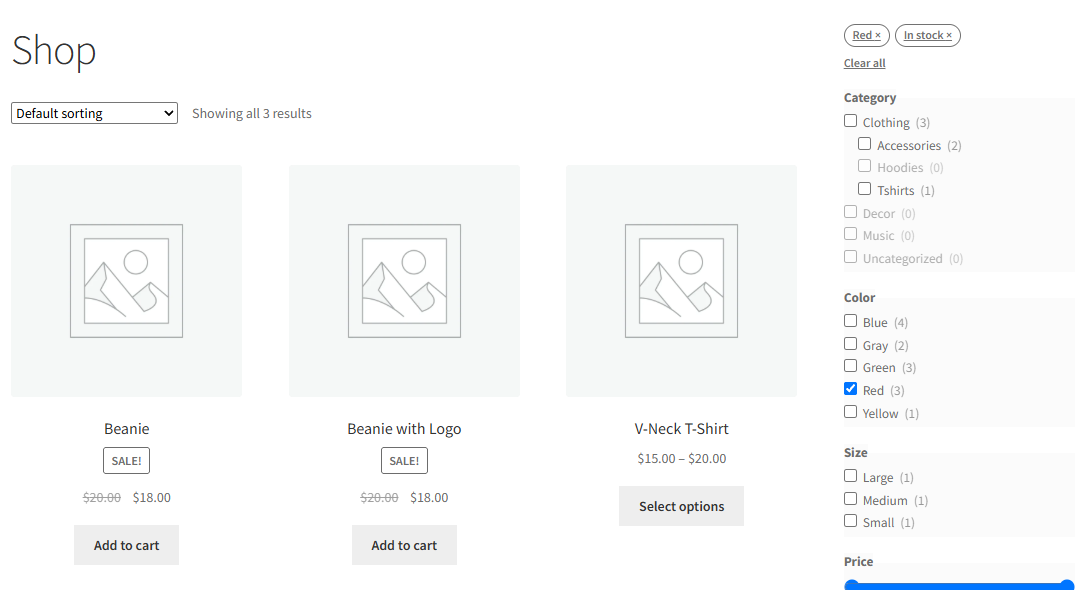 Remove with one click
Three products behind it
Three results
Remove with one click
Three products behind it
Three results
Under 768 pixels the set folds behind a Filters button with a badge. Without JavaScript it stays open.
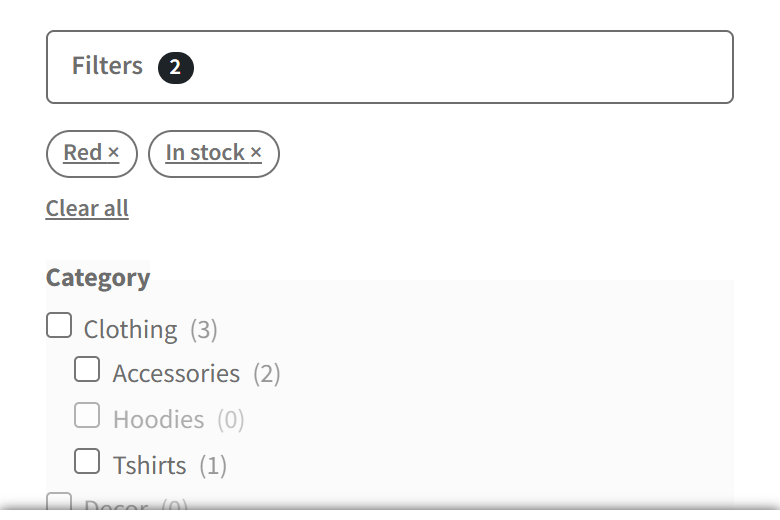 Folded on phones
Every combination of filters is its own address. Two settings keep them out of search engines.

Siftwren Pro
Pro is a separate add-on that adds three things to the filter sets you already have.
One site per licence · plus VAT where applicable · thirty-day refund · What stops if you stop paying
Illustration · what the three Pro features do
Compare
| Free | Pro | |
|---|---|---|
| Unlimited filter sets, with every kind of filter | ✓ | ✓ |
| Counts that match, also with variations and stock | ✓ | ✓ |
| Filtering without a reload, or with an Apply button | ✓ | ✓ |
| Block, shortcode and Elementor widget | ✓ | ✓ |
| noindex and robots.txt rules | ✓ | ✓ |
| Colour, image and label swatches | — | ✓ |
| SEO pages for chosen combinations | — | ✓ |
| Show a filter only on chosen categories | — | ✓ |
| Updates and email support | — | ✓ |
| $0 | — |
FAQ
Complete. Counts, variation and stock handling, any number of filter sets, the block, shortcode and Elementor widget and the search-engine rules are free, with no limit. Nothing in the free plugin is switched off without Pro.
They are worked out the way WooCommerce narrows the shop: a sold-out variation is not a match when you ask for products in stock. On our test shop, with WooCommerce’s own sample products, every number equalled the products after a click.
Only the shop’s main query. Attributes, price, stock status and rating use WooCommerce’s own address parameters. Siftwren adds categories, tags, brands and the sold-out rule.
Its script and style load only where a set is drawn, and a shopper’s visit writes nothing to your database.
Swatches, SEO pages and category rules keep working, nothing disappears, and your shop does not stop. What ends is updates and support. The full list is on the pricing page.
The free plugin makes no outbound requests of any kind. Pro checks its licence at most weekly and for updates at most twice a day, only from admin or a scheduled task. Written out in full here.
Not in the directory yet, so searching your admin for the name will not find it today. Why, and what happens next →
Plugins → Add New, search for Siftwren Product Filter, install, activate. Add a filter set and place it on your shop.