 Siftwren Product Filter
In a classic theme
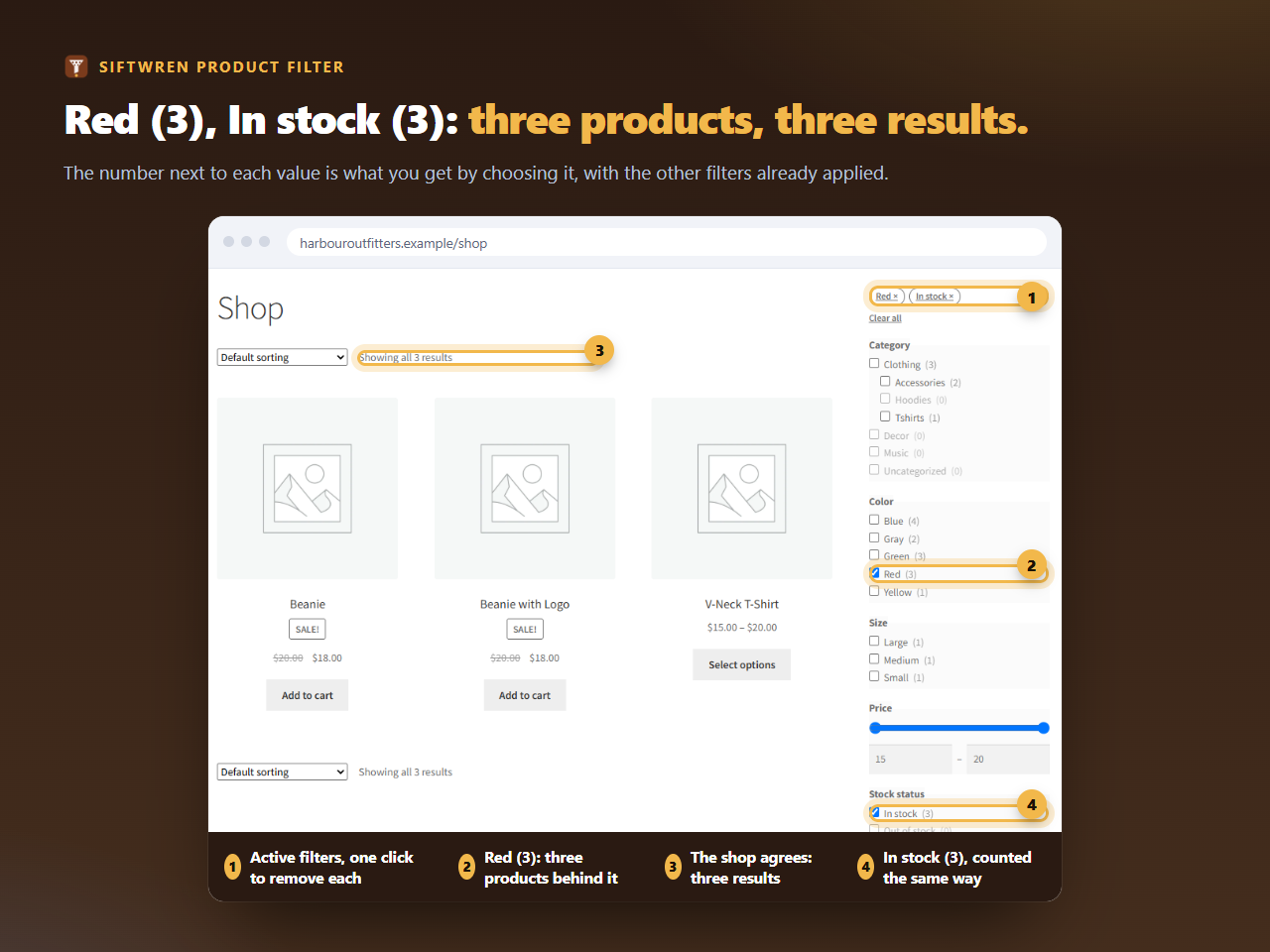
Add a Text widget to the shop sidebar and put [siftwren_filter id="12"] in it, with your own id. Storefront, the theme WooCommerce makes, shows the shop with its sidebar on either side, which is how the screenshot above was taken. The set sits at the top of the sidebar, chips first, then the filters in the order you gave them.
In a block theme
Edit the shop template in the Site Editor. Put a columns block around the product collection, make one column narrow, and add the Siftwren Product Filter block in it. The same works in a template part used for the sidebar.
What the sidebar needs
- enough width for a value, its count and a checkbox, roughly 220 pixels or more;
- the sidebar to be shown on the shop and category pages, not only on posts;
- the sidebar below the products on phones, or a layout that stacks, since the set folds behind a button there.
What it looks like
The set takes its colours and type from the theme and brings its own styling only for layout. Counts are a lighter shade, values with no products are dimmed, and the price slider and its fields fit the sidebar’s width. Everything that scripts can do is also possible with plain links and forms, so a sidebar with the set drawn is still usable if JavaScript fails.
Many shoppers use the sidebar once and then the chips, so check that chips and Clear all at the top of the set are easy to see in your theme.